Oicana is in public beta
Generating PDFs from application code is usually a pick-your-poison choice. HTML-to-PDF tools have fragile pagination and weak typography, PDF libraries put verbose layout code into your application, and SaaS PDF builders often come with proprietary template formats and vendor lock-in.
Oicana takes a different route. Templates are plain Typst projects. Your application passes typed inputs (JSON, images), and Oicana compiles a PDF.
- Multi-platform: the same template works across all integrations: browser, Node.js, C#, Java, Rust, Python, and PHP.
- Powerful layouting: templates use the full power of Typst, including its package ecosystem.
- Performant: PDFs can generate in single digit milliseconds with warmed-up templates in native integrations.
- AI and version control ready: templates are text files. They live next to your code, and AI can help write them.
- Minimal vendor lock-in: templates are plain Typst projects. The Typst compiler is open source.
A quick taste
Section titled “A quick taste”Here’s a minimal Oicana template, a single Typst file with a manifest defining one JSON input:
#import "@preview/oicana:0.2.0": setup
#let read-project-file(path) = read(path, encoding: none)#let (input, oicana-image, oicana-config) = setup(read-project-file)
#set document(date: datetime.today())
= Hello from Oicana, #input.info.name[package]name = "example"version = "0.1.0"entrypoint = "main.typ"
[tool.oicana]manifest_version = 1
[[tool.oicana.inputs]]type = "json"key = "info"Typst is a modern markup-based typesetting system. In main.typ, the = marks a heading and # switches to code mode. The first line imports the Typst Oicana package and the next two lines set it up. In the last line is the actual visual content of our document. #input.info.name interpolates the name field of the info input into the document.
In typst.toml, we define metadata for the template like a name, entrypoint, and inputs. The example defines a single input of type json (see the Oicana documentation on inputs). If the input value is { "name": "Alice" }, the content of our document will be a header reading “Hello from Oicana, Alice”.
Template development
Section titled “Template development”There are good options for working on Typst documents like the official webapp and several IDE plugins. this is what it can look like to work on an Oicana template in VS Code using the Tinymist Typst extension with syntax highlighting and live preview:
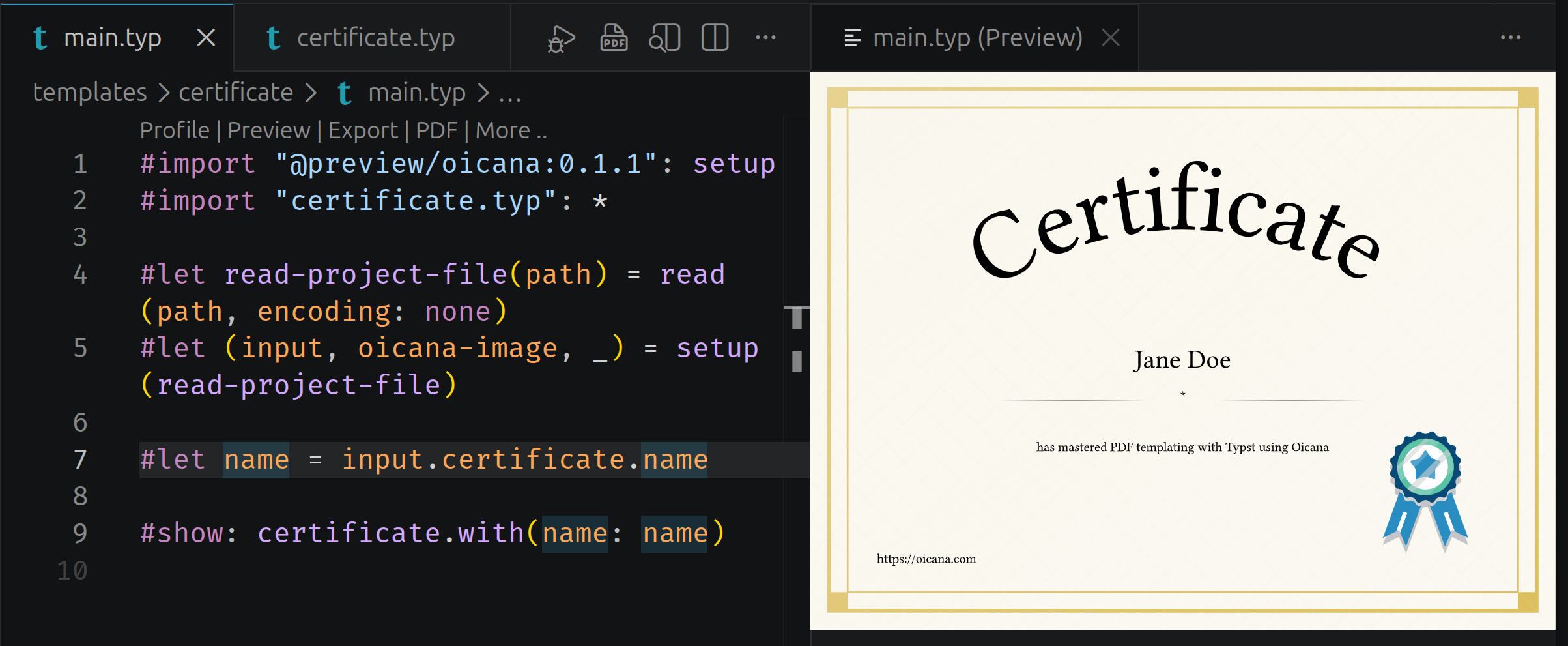
You can find an open source collection of example Oicana templates on GitHub, including the certificate template shown above.
Compile from your application
Section titled “Compile from your application”If you install the Oicana CLI and run oicana pack in the template directory, it produces the file example-0.1.0.zip that any Oicana integration can compile. Passing { "name": "Alice" } for the info input from your application looks like this in the different integrations (omitting some general boilerplate):
import { Template } from '@oicana/browser';
const templateFile = await fetch('/example-0.1.0.zip');const template = new Template(new Uint8Array(await templateFile.arrayBuffer()));
const jsonInputs = new Map<string, string>();jsonInputs.set('info', JSON.stringify({ name: 'Alice' }));
const pdf = template.compile(jsonInputs, new Map());
using System.Text.Json.Nodes;using Oicana;using Oicana.Config;using Oicana.Inputs;
var template = new Template(File.ReadAllBytes("example-0.1.0.zip"));
var jsonInputs = new Dictionary<string, JsonNode>{ ["info"] = JsonNode.Parse("""{ "name": "Alice" }""")!,};
var pdf = template.ExportPdf(jsonInputs);import com.oicana.Template;import java.nio.file.Files;import java.nio.file.Path;import java.util.Map;
byte[] templateBytes = Files.readAllBytes(Path.of("example-0.1.0.zip"));try (var template = new Template(templateBytes)) { byte[] pdf = template.compile(Map.of("info", "{\"name\":\"Alice\"}"), Map.of());}import { readFile } from 'node:fs/promises';import { Template } from '@oicana/node';
const template = new Template(await readFile('example-0.1.0.zip'));
const jsonInputs = new Map<string, string>();jsonInputs.set('info', JSON.stringify({ name: 'Alice' }));
const pdf = template.compile(jsonInputs, new Map());use std::fs::File;
use oicana::Template;use oicana_input::{JsonInput, TemplateInputs};
let mut template = Template::init(File::open("example-0.1.0.zip")?)?;
let mut inputs = TemplateInputs::new();inputs.with_input(JsonInput::new( "info", serde_json::json!({ "name": "Alice" }).to_string(),));
let pdf = template.compile(inputs)?;import jsonfrom pathlib import Path
from oicana import Template
template_bytes = Path("example-0.1.0.zip").read_bytes()
with Template(template_bytes) as template: pdf = template.compile( json_inputs={"info": json.dumps({"name": "Alice"})}, )use Oicana\Template;
$template = new Template(file_get_contents('example-0.1.0.zip'));
try { $pdf = $template->compile( jsonInputs: ['info' => ['name' => 'Alice']], );} finally { $template->close();}One template, seven tech stacks including the browser. The getting started guide walks through this end-to-end for your stack of choice.
Pricing
Section titled “Pricing”Non-commercial use is free: Personal projects, hobby use, research, education, and use by charitable organizations, educational institutions, public research organizations, and government institutions are covered by the PolyForm Noncommercial License.
Commercial licenses are available on the homepage. Licenses are per application, priced by company size, and every subscription includes the CLI and all integrations. All prices include VAT.
- Startup: €19/month, for companies up to €2M yearly revenue
- Scaleup: €49/month, for companies up to €25M yearly revenue
- Enterprise: €99/month, for companies above €25M yearly revenue
Annual billing saves 15%. Every subscription comes with a 30-day money-back guarantee. If Oicana doesn’t fit, email support@oicana.com for a refund.
What’s next
Section titled “What’s next”Oicana was already used in production during the alpha and improved based on the learnings. The same idea goes for the beta. If something feels off, please let us know. That’s the feedback that shapes the road from beta to 1.0.
Give Oicana a try and get started with the setup guide.